
Level Up Your Skill
Supporting files and advanced patterns
Your skill works and you’ve tested it. Now let’s make it great — by giving it the supporting materials it needs to work independently.
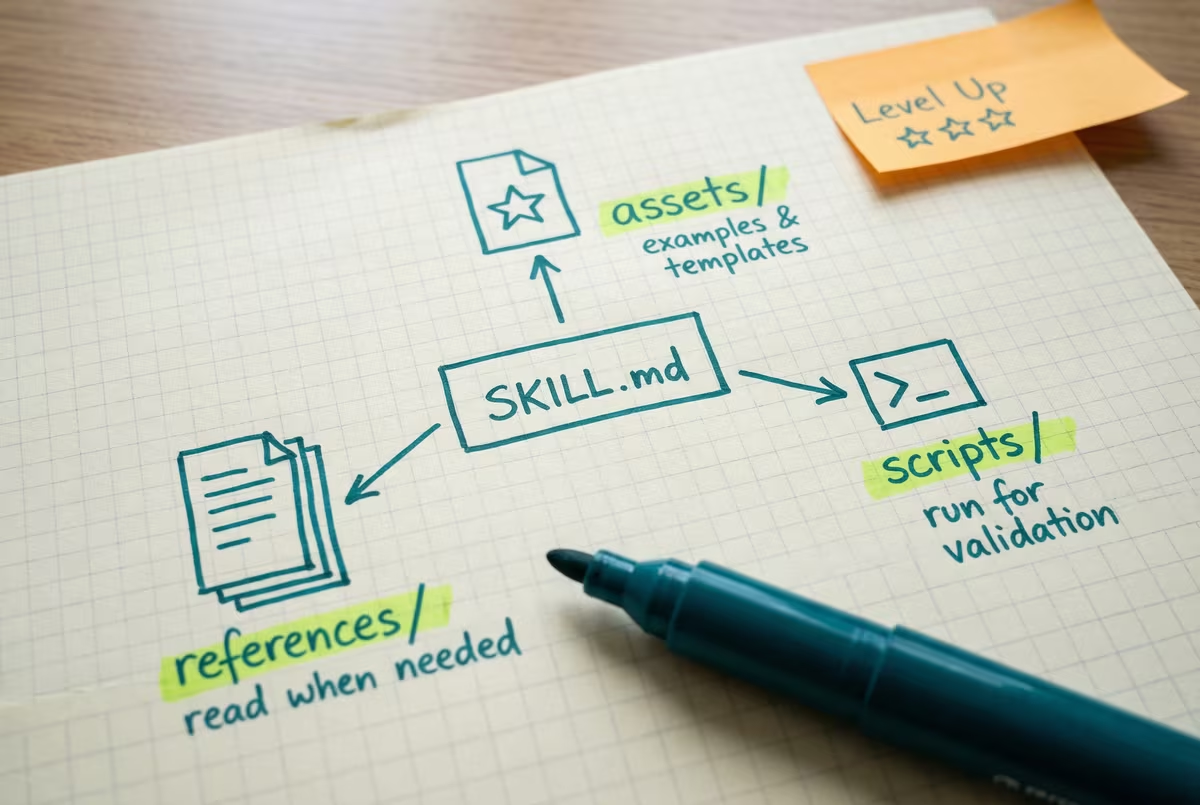
Your SKILL.md doesn’t have to do everything alone. The open standard defines three optional folders you can add alongside it:
references/
Additional documentation the AI reads when it needs more context — brand guidelines, style guides, technical references, domain-specific knowledge. These files only load when the AI needs them, so they don’t use up context until accessed.
Reference it in SKILL.md: “See references/brand-guide.md for voice and tone rules”
Example folder structure
bigquery-analysis/
  SKILL.md          ← Overview + navigation
  references/
    finance.md      ← Revenue, billing metrics
    sales.md        ← Pipeline, opportunities
    product.md      ← Usage analytics
When you ask about revenue, the AI reads only finance.md. The other files stay unloaded.
Best for: brand voice, compliance rules, API docs, process documentation.
assets/
Static resources the AI uses as inputs — document templates, example outputs, images, lookup tables. Instead of describing the format in words, give the AI the actual template or example.
Reference it in SKILL.md: “Use the template in assets/report-template.md”
Example folder structure
weekly-status-report/
  SKILL.md                  ← Instructions for writing reports
  assets/
    report-template.md      ← The actual template to fill in
    good-example.md         ← A real example of great output
    edge-case-example.md    ← How to handle tricky situations
The AI reads the template and examples before writing, so it matches your format every time.
Your example IS your specification. A concrete example of good output is worth more than paragraphs of rules. If you add one file to assets/, make it an example of what great output looks like.
Best for: templates, example outputs, configuration files, images.
scripts/
Executable code the AI runs as part of the skill. Scripts handle the deterministic, mechanical parts — validation, data extraction, formatting. Instructions handle the judgment parts.
Don’t be scared by code. You don’t need to write scripts yourself — ask your AI to write one when you need it. Just describe what you want validated or processed, and it will generate the script for you.
Be clear about intent in SKILL.md: “Run scripts/validate.py to check the output” (execute) vs. “See scripts/validate.py for the validation logic” (read as reference).
Example folder structure
pdf-processing/
  SKILL.md              ← Instructions for processing PDFs
  scripts/
    analyze_form.py     ← Extract form fields from PDF
    fill_form.py        ← Apply field values to PDF
    validate.py         ← Check output for errors
The AI runs these scripts as needed — analyze first, fill the form, then validate the result.
Best for: validation, data processing, format conversion — anything that should work the same way every time.
Validate, fix, repeat
Tell the AI to run your validation script, fix whatever it flags, then run it again. This loop catches mistakes that instructions alone will miss.
Make errors obvious
When a script fails, it should say exactly what went wrong — not just crash. The clearer the error message, the faster the AI can fix the problem.
Scripts for the mechanical, instructions for the creative
Use scripts for things that should work the same way every time (validation, formatting). Use instructions for things that require judgment (tone, what to include).
For more patterns, see Anthropic’s guide to writing scripts for skills.
Putting it all together
Here’s what a skill looks like when it uses all three folders:
pdf-processing/
  SKILL.md              ← "Extract text with pdfplumber..."
  references/
    FORMS.md            ← Form-filling guide
    REFERENCE.md        ← API reference for all methods
  assets/
    examples.md         ← Input/output examples
  scripts/
    analyze_form.py     ← Extract form fields from PDF
    fill_form.py        ← Apply field values to PDF
    validate.py         ← Check output for errors
The SKILL.md contains quick-start instructions and links to each file. When you ask about form filling, the AI reads FORMS.md. When it needs to validate, it runs validate.py. The other files stay unloaded.
Takeaway: Supporting files are how you go from “it works” to “it works exactly how I want, every time.” Start with one reference file or one example — you don’t need all three folders on day one.
Once you start adding supporting files, these tips will help you keep things organized:
All supporting files should link directly from SKILL.md. Avoid chains like SKILL.md → advanced.md → details.md — the AI may only partially read nested references.
For reference files over 100 lines, include a contents section at the top. This helps the AI see the full scope even when previewing.
If your skill uses MCP (Model Context Protocol) tools, always use fully qualified names: ServerName:tool_name. Example: BigQuery:bigquery_schema instead of just bigquery_schema.
Instead of “ALWAYS use bullet points for the key findings section,” try “Use bullet points for the key findings section. Executives scan these reports in under 60 seconds and bullets make the critical numbers stand out.” Models are smart enough to generalize from reasoning. Rigid rules without context get followed literally when they should be adapted.
For the complete guide including workflow patterns, feedback loops, and dependency management, see Anthropic’s full best practices documentation.
Need help bringing this to your team?
We work alongside your team to build AI-native workflows — from one-week sprints to full engineering acceleration. No handoffs, no slide decks.
Talk to us